
If you have a customers email address or IP you would like to blacklist for your account, please follow the steps below.
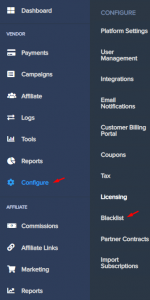
Step 1: From your PayKickstart dashboard to Configure > Blacklist Buyers.
Step 2: In the top right corner of the page select “Add Blacklist”
Step 3: Select the blacklist type in the top box and enter the corresponding information in the bottom box.
You have two options for blacklisting:
By Email

By IP Address

Step 4: After entering the corresponding information, select the “BAN” button to complete the action.